




Main Features of the Technology Survey Progress Report

 |
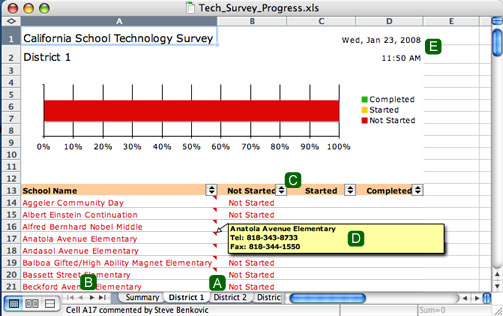
Each local district appears on its own worksheet. To access a particular local district, click on the appropriate tab at the bottom of the screen. In addition to the local districts, there is also a “summary” tab and possibly an “unknown” tab. The summary worksheet shows the completion status of the entire district. The unknown worksheet contains schools for which I could not determine the local district. (Send me an email if you know the local district) |
 |
It's likely that all of the worksheet tabs will not be visible on the screen at one time. Use the little triangle buttons to scroll left and right through the worksheet tabs. |
 |
You can click on the grey / black buttons in the header to sort the schools. Clicking on the button next to "Completed", for example, will sort the schools acording to the date they completed the survey. Clicking on the button next to "School Name" will put the schools in alphabetical order. |
 |
If you “hover” (do not click) your pointer over the name of a school that has not completed the survey, a box will pop up with the school's voice and fax numbers. |
 |
Every time the report is updated it is time and date stamped. This makes it easy to be sure that you are looking at the latest copy. |